X9: Repetitive Tasks
It is not true that life is one damn thing after another. It’s one damn thing over and over. — Edna St. Vincent Millay
Repetition is the mother of learning, the father of action, which makes it the architect of accomplishment. — Zig Ziglar
In Chapter X8, you were introduced to conditional execution in the form of the JavaScript if statement. Known as a control statement, an if statement is used to control the execution of other JavaScript statements. An if statement evaluates a condition and, based on the result, determines whether a particular statement or sequence of statements will be executed. If statements are useful in solving problems that involve choices—for example, deciding what letter grade a student has earned or whether dice doubles have been rolled.
Closely related to the concept of conditional execution is that of conditional repetition. Many problems involve repeating some task over and over until a specific condition is met. For example, you might wish to roll dice repeatedly until you get doubles or repeatedly prompt a user until they enter a valid number. The JavaScript control statement that enables conditional repetition, the while loop. In this chapter, you will learn how while loops work and how they enable pages to solve problems involving conditional repetition.
Conditional Repetition
Consider the following puzzle:
If you start with a piece of paper, and repeatedly fold it in half, how many folds would it take for the thickness of the paper to reach from the earth to the sun?
Ignoring the physical limitations that would be involved (e.g., the size of the paper, how you would even fold it when it gets huge), this is an interesting theoretical puzzle that we can solve with an algorithm. Essentially:
- Start with a piece of paper.
- While the thickness < distance to the sun:
- double the thickness (by folding it in half)
EXERCISE 9.1: How many folds do you think it would take to reach the sun? Would it be in the tens? hundreds? thousands? millions?
While loop
A while loop is a JavaScript control statement that implements conditional repetition. Its form closely matches the use of "while" in English (such as in the above paper folding algorithm):
        while (BOOLEAN_TEST) {
          STATEMENTS_TO_EXECUTE_WHILE_TRUE
        }
You may notice that a while loop looks similar to an if statement — the only difference is replacing the word "if" with "while." This is not a coincidence. Both are control statements driven by a Boolean (i.e., true/false) test. If the test succeeds (i.e., evaluates to true), the statements inside the curly braces are executed. The difference between them is that a while loop is not done after executing the statements. It reevaluates the test and, if it still succeeds, it then executes the statements again. Execution of the statements in a while loop repeats until the test eventually fails.
The HTML document in EXAMPLE 9.1 implements the paper folding algorithm using a while loop. The page has number boxes where you can enter the thickness of the paper (in inches) and the goal distance (in miles). The default values are 0.004 inches for the paper thickness (a common thickness) and 93 million, or 93e6, miles for the goal (the distance from the earth to the sun). The function accesses those numbers, converts the goal from miles to inches, and repeatedly folds the paper until the desired thickness is reached. The numFolds counter is used to keep track of the number of folds, which is printed when the while loop terminates.
EXERCISE 9.2: Confirm that the Web page from EXAMPLE 9.1 behaves as described by clicking the 'See in Browser' button and then clicking the "Start Folding" button. How many folds does it take to reach the sun? Were you surprised by the answer?
The nearest star to the earth is Proxima Centauri, which is 4.25 light years away. In miles, that is 25 trillion (or 25e12) miles. How many folds would it take to reach Proxima Centauri?
The center of the Milky Way galaxy is a staggering 26 thousand light years away. In miles, that is 150 quadrillion (or 150e15) miles. How many folds would it take to reach the center of the Milky Way?
The paper folding puzzle demonstrates the power of exponential growth. If you repeatedly double a value, there is a snowball effect with the value growing very quickly. In the case of paper folding, the last fold covers half the distance to the sun! Exponential growth is the flipside of logarithmic shrinking. Recall the binary search algorithm from Chapter C6. This algorithm finds an item in a sorted list by repeatedly checking the middle then cutting the list in half. The number of steps needed to reduce the list size down to 1 was the logarithm (base-2) of the initial size. We used the notation O(log N) to describe this performance. The doubling effect of paper folding is just halving in reverse. It follows that the paper folding algorithm is also O(log N), where N is the goal distance.
 Common Errors to Avoid
The statements in a while loop will execute as long as the loop test succeeds (i.e., evaluates to true). Therefore, it is possible they will not execute at all, if the test is initially false. It is also possible that they might execute forever, if the test is always true. For example, consider the while loop in EXAMPLE 9.1. If the first statement inside the loop, which doubles the thickness, were accidentally omitted, then each pass through the loop would increment the number of folds but leave the thickness unchanged. As a result, the loop test would continue to succeed and the loop would execute forever.
Such a loop is known as an infinite loop. When defining while loops, you must be very careful to avoid infinite loops. At a minimum, the statements inside the loop must affect the loop test in some way (e.g., if the test involves variables, at least one of those variables must change inside the loop). Otherwise, an infinite loop is sure to occur.
EXERCISE 9.3: Delete the first statement inside the while loop in EXAMPLE 9.1 and test the modified page. What happens in the page as a result? Is there any indication that an infinite loop is running or must you infer it from the lack of output?
Example: Dice Stats Revisited
Several examples from Chapter X8 involved simulating dice rolls and keeping statistics, such as the number of doubles. Each time a button was clicked, a function was called to simulate the rolls. Global variables were used to keep count of the number of rolls and the number of doubles. These pages were sufficient for obtaining statistics on a few dice rolls but using them becomes very tedious if many rolls are required. For example, suppose you wanted to use a page to confirm that the odds of rolling doubles are 1 in 6. If you rolled the dice only six times, it would not shock you if you didn't get any doubles or maybe rolled two or more doubles. When the number of rolls is small, a few lucky or unlucky rolls can greatly skew the statistics. To generate statistically meaningful results, you need to simulate enough rolls for lucky and unlucky streaks to balance out. Fortunately, a while loop can automate this process.
To simulate 1,000 dice rolls, we could utilize a while loop of the following form:
    numRolls = 0;
    while (numRolls < 1000) {
      CODE_TO_SIMULATE_THE_DICE_ROLL
      numRolls = numRolls + 1;

      CODE_TO_SOMEHOW_PROCESS_THE_DICE_ROLL
    }
In this generic example, the variable numRolls is used to keep track of the number of rolls that have been performed so far. Initially that variable is set to 0 since no rolls have been performed yet. Inside the while loop is the code for simulating a random roll of the dice, incrementing the numRolls counter (in response to the new roll), and whatever additional code is needed to process the roll. The loop test succeeds as long as the number of rolls performed is less than 1,000. Thus, the overall effect of the loop is to simulate and process 1,000 dice rolls.
The HTML document in EXAMPLE 9.2 uses a while loop of this form to simulate repeated dice rolls and count the number of doubles (Figure 8). When the DoRolls function is called: (1) the desired number of rolls is accessed from the number box and the variables numRolls and numDoubles are initialized; (2) within the loop, numRolls is incremented after each roll is simulated, but numDoubles is incremented only when that roll produced doubles; (3) after the loop terminates (i.e., when the number of rolls finally equals the desired number), a message is displayed containing the number of doubles.
EXERCISE 9.4: Confirm that the Web page from EXAMPLE 9.2 behaves as described by clicking the "See in Browser" button and performing multiple experiments.
Conduct 5 experiments with 6,000 rolls and record the number of doubles for each. How consistent are the counts? How close are they to the expected number of 1,000?
Conduct 5 experiments with 60,000 rolls and record the number of doubles for each. How consistent are the counts? How close are they to the expected number of 10,000? Are the counts more consistent and/or accurate than those obtained with 1,000 rolls?
EXERCISE 9.5: What would you expect to happen if the user entered 0 or a negative number in the number box in EXAMPLE 9.2, then clicked the button to simulate dice rolls? Verify or refute your prediction using the page.
EXERCISE 9.6: Modify the document in EXAMPLE 9.2 so that, in addition to displaying the number of doubles, it also displays the percentage, rounded to the nearest tenth. For example:
Out of 1000 rolls, 162 (16.2%) were doubles.
 Designer Secrets
While the dice simulation page in EXAMPLE 9.2 shares several features with the dice pages from Chapter X8, it has important differences as well. In the Chapter X8 pages, each button click initiates a single roll of the dice. As such, it made sense to show the die images and update the counts (using global variables) in the page after each roll. In contrast, a button click in EXAMPLE 9.2 initiates a potentially large number of dice rolls and displays the cumulative stats. If you are simulating 1,000 rolls, it doesn't make sense to show each individual roll or to update the counts in the page after each roll. Thus, the DoRolls function uses local variables to store the roll and double counts, only displaying the counts when all the rolls have been completed.
Example: Rolling Until
Consider a variant of the dice page in EXAMPLE 9.2. Instead of simulating a set number of dice rolls and counting doubles, we instead wish to roll until doubles are encountered. Since the odds of rolling doubles are 1 in 6, you would expect it to require 6 rolls, on average, to obtain doubles.
The HTML document in EXAMPLE 9.3 implements this variant. When the RollUntil function is called, it simulates and counts the first roll of the dice. Then a while loop tests to see if the dice are different. If so, it simulates a new roll and increments the number of rolls, repeating until doubles are finally obtained.
EXERCISE 9.7: Confirm that the Web page from EXAMPLE 9.3 behaves as described by clicking the "See in Browser" button and performing ten experiments. What was the fewest number of rolls you needed to obtain doubles? What was the largest number?
EXERCISE 9.8: You may have noticed that if doubles are obtained on the first roll, the displayed message is not grammatically correct. That is, it will state "It took 1 rolls." Modify the document so that the message uses the singular "roll" if the number of rolls is 1; otherwise, it uses the plural "rolls."
Cumulative Output
When you simulated dice rolls in EXAMPLE 9.3, you had to take it on faith that the reported number of rolls to obtain doubles was accurate. It would be better if each of the rolls was displayed, so that you could confirm each roll up until doubles. EXAMPLE 9.4 modifies the page to display each roll. Before the loop, the rollsP paragraph has a message assigned to it, displaying the first roll of the dice. Inside the loop, each subsequent roll is added to the paragraph using the add-to operator (+=). This operator adds text to the end of the paragraph as opposed to replacing the existing text. After the loop, a text displaying the number of rolls is added to the paragraph, again using +=.
EXERCISE 9.9: Confirm that the Web page from EXAMPLE 9.4 behaves as described by clicking the "See in Browser" button and performing multiple experiments. Note that the first assignment to rollsP.innerHTML, which appears before the loop, uses the = operator — since this is the first roll, there is nothing to add output to. Subsequent statements add text to the paragraph using +=. What do you think would happen if you replaced the = with += in the first assignment to rollsP.innerHTML? Make the change and see if you were right by performing multiple experiments.
EXERCISE 9.10: Modify the HTML document from EXAMPLE 9.4 so that, instead of rolling until any double is obtained, it rolls until double six (sometimes referred to as boxcars) is obtained. What was the fewest number of rolls you needed to obtain a double six? What was the largest number?
The += add-to operator is really just shorthand for an assignment that adds text to the current contents of a text element, then assigns the result back to the element. For example:
rollsP.innerHTML = rollsP.innerHTML + roll1 + '-' + roll2 + '<br>';
Since this form of assignment is common for producing cumulative output (i.e., output that is repeatedly added to a text element), the += notation is both shorter and easier to read:
rollsP.innerHTML += roll1 + '-' + roll2 + '<br>';
EXERCISE 9.11: The += notation can be applied to numerical assignments as well as for cumulative output. For example, you could replace the statement
numRolls = numRolls + 1;with
numRolls += 1;Make this replacement in EXAMPLE 9.4 and confirm that the page behaves as before.
Example: Compound Interest Revisited
Recall the Compound Interest page from Chapter X6 (EXAMPLE 6.4). This page displayed the compound interest earned on an investment. The user was required to specify the initial investment, the interest rate, and the number of years. The page calculated the final amount that would accumulate using a mathematical formula. For an investor with specific goals in mind, a different design for this page might be more useful. Instead of specifying the number of years, the investor could specify their investment goal, and then the page would then calculate and show the value of their investment each year until the goal was reached.
The HTML document in EXAMPLE 9.5 accomplishes this. The page has three number boxes where you can enter the initial investment amount, the interest rate, and your goal. The AccumulateInterest function accesses these numbers and shows the amount as it grows from year to year. Inside the loop, the interest for the current amount is calculated and added to the amount, which is then displayed along with the year number. This continues until the accumulated amount equals or exceeds the goal. Note that the amount is displayed using the .toFixed(2) suffix, which gives the appearance of dollars and cents.
EXERCISE 9.12: Confirm that the Web page from EXAMPLE 9.5 behaves as described by clicking the "See in Browser" button with different values in the boxes.
Recall from EXERCISE 6.7 (in Chapter X6) that the number of years needed to double an investment is 72/rate. Thus, doubling your investment with a 3.6% interest rate requires 72/3.6 = 20 years. Confirm this using the page. How many years would it take to double your investment if the interest rate is 4.8%?
Putting It All Together
An interesting unsolved problem in mathematics concerns what is called the hailstone sequence. The following algorithm defines this sequence:
- Start with any number (a positive integer).
- While that number is not 1:
- If the number is even, then divide it by 2.
- Otherwise, multiply it by 3 and add 1.
For example, the hailstone sequence starting with 5 is:
5 → 16 → 8 → 4 → 2 → 1
Similarly, the hailstone sequence starting with 35 is:
35 → 106 → 53 → 160 → 80 → 40 → 20 → 10 → 5 → 16 → 8 → 4 → 2 → 1
If you are curious, the reason that hailstone sequences stop at 1 is that further extensions would just loop (1 → 4 → 2 → 1 → 4 → 2 → 1 ...). It is conjectured that, no matter what positive integer you start with, the hailstone sequence will eventually terminate at 1 (as opposed to running forever). Mathematicians have proven that this hypothesis holds for all starting values up to 2.36x10²¹. However, the conjecture has yet to be proven true for all numbers.
The HTML document in EXAMPLE 9.7 uses a while loop with cumulative output to display a hailstone sequence.
There are several details to note about this document and how it implements the desired appearance and behavior of the page.
- The
Hailstonefunction begins by accessing the initial number in the sequence from the number box and displays it in the paragraph. - Each time through the while loop, the number is updated (divided in half if even, tripled then increments if odd). Note that the remainder operator (%) is used to determine even/odd. This operator returns the remainder after dividing the first number by the second. This,
(num % 2)will evaluate to 0 ifnumis even, and to 1 ifnumis odd. - After updating the number, it is added to the
sequencePparagraph. Note the use of+=here, to ensure that the output is cumulative. - Finally, the while loop terminates when
numreaches 1 (if it ever does!).
EXERCISE 9.13: Confirm that the Web page from EXAMPLE 9.6 behaves as described by clicking the "See in Browser" button and generating various hailstone sequences. Which number from 1 to 20 generates the longest sequence?
Hailstone sequences can be very long. For example, the hailstone sequence beginning with 97 has length 119. EXAMPLE 9.9 adds a counter, length, to keep track of the length of the sequence, incrementing it each time a number is generated. Note that the count begins at 1, since the initial number in the sequence is added before the loop. The length counter is displayed after the loop.
EXERCISE 9.14: Confirm that the Web page from EXAMPLE 9.7 behaves as described by clicking the "See in Browser" button and generating various hailstone sequences. Use this page to answer the following questions:
- What is the length of the hailstone sequence starting at 100? Starting at 200? Starting at 400?
- In general, if the hailstone sequence starting at some number N has length L, how long would the hailstone sequence starting at 2N be? Explain your reasoning.
- What is the smallest starting number that generates a hailstone sequence with a length of at least 15?
- Identify a starting number for which the hailstone sequence is at least 30 numbers long. What is the length of the sequence? If you add or subtract 1 from this starting number, how long are the hailstone sequences?
Chapter Summary
- A while loop is a control statement that specifies conditional repetition.
- A while loop is similar to an if statement in that its behavior is dependent on a Boolean condition. Unlike an if statement, however, a while loop repeatedly executes the statement(s) it controls as long as the condition remains true.
- The general form for a while loop is as follows:
while (BOOLEAN TEST) { STATEMENTS EXECUTED AS LONG AS TRUE } - If the loop test succeeds (evaluates to true), then the statements inside the curly braces are executed. After iterating through the loop, the browser returns to the beginning of the while loop and reevaluates the loop test. This process repeats until the loop test fails (evaluates to false).
- Infinite loops are while loops that never terminate—that is, their conditions never evaluate to false. To avoid creating an infinite loop, you must ensure that the loop contains code that affects the loop test in some way (e.g., by changing a variable in the loop test).
- A common use of while loops is to generate and display a sequence of values (e.g., dice rolls or investment balances over years). Each time through the loop, cumulative output can be added to the page using the add-to operator +=, e.g.,
messageP.innerHTML += "new text<br>";
Projects
All projects should follow the basic design guidelines described in this and the previous chapters. These include:
- A while loop should be used when a task requires the repeated execution of statements.
- The closing curly-brace
}in a while loop should align with the beginning of the loop. Any statements within the loop should be indented for readability. - When generating cumulative output, utilize the add-to operator (+=) to add to a text element (e.g., a paragraph or div).
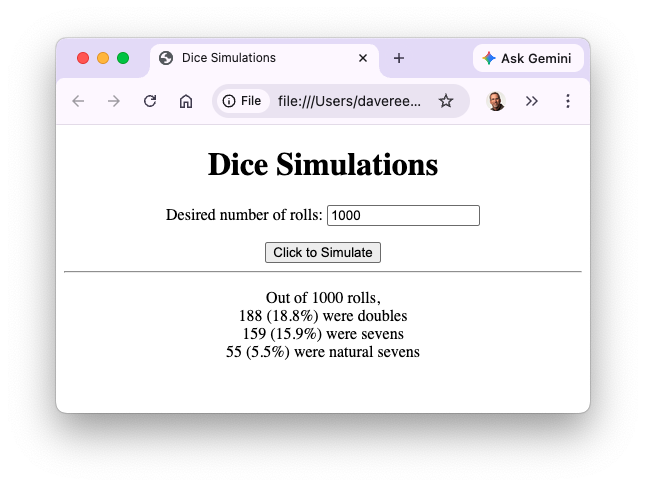
PROJECT 9.A: Download a copy of the HTML document from EXAMPLE 9.2 (by clicking on the Download link) and save it on your computer under the name dicestats.html. Using a text editor of your choice, modify the document so that so that it also counts the number of sevens and natural sevens (similar to EXAMPLE 8.7 from Chapter X8). The counts and their percentages should be displayed in the page, as shown below:
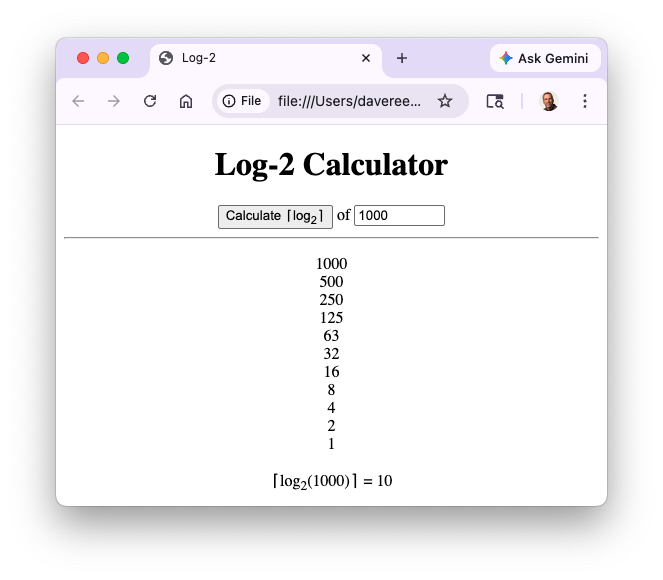
PROJECT 9.B: The paper folding page (EXAMPLE 9.1) demonstrated exponential growth. Using a text editor of your choice, create a new Web page named log2.html that similarly demonstrates logarithmic shrinking. The page should have a number box where you can enter a positive integer. When the button is clicked, the number should be repeatedly halved (rounding up if odd) until it reaches 1. For example, 14 is halved to 7, which is halved (rounding up) to 4, which is halved to 2, which is halved to 1. The number of times that the number can be halved is the logarithm (base-2) of that number, rounded up. Thus, ⌈log2(7)⌉ = 3. In addition to the sequence of halvings, your page should display the number of halvings, as shown below. Hint: ⌈ is displayed using the special symbol ⌈ and ⌉ is displayed using ⌉.
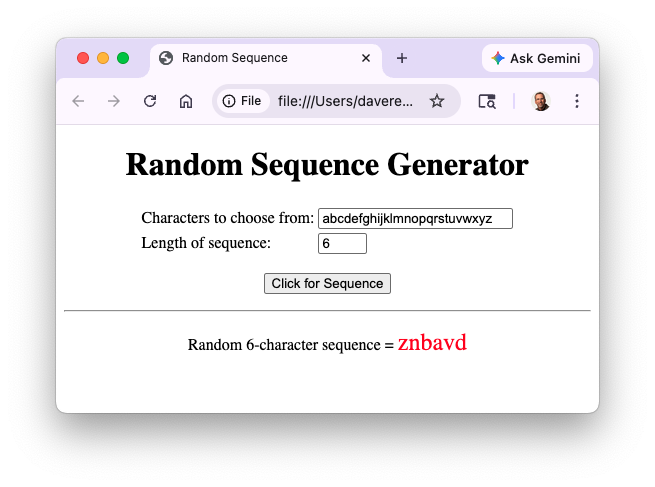
PROJECT 9.C: The Web page from EXAMPLE 7.8 in Chapter X7 utilized the RandomChar function to generate random 3-character sequences. Download a copy of this page (by clicking on the Download link) and save it under the name randseq.html. Modify the page so that it has an additional number box, where you can specify the length of the random character sequence. Then, modify the function to utilize a while loop to generate a sequence of that length. Hint: you will need to initialize a variable to store the empty string "". Then, each time through the loop, you will select a random character (as before) and add it to the string. Your page should appear as shown below:
Use your page to generate random 3-letter sequences. How many sequences did you have to generate before you obtained a common word? Perform the same experiment with 4-letter sequences? Did it take fewer or more sequences to generate a word?
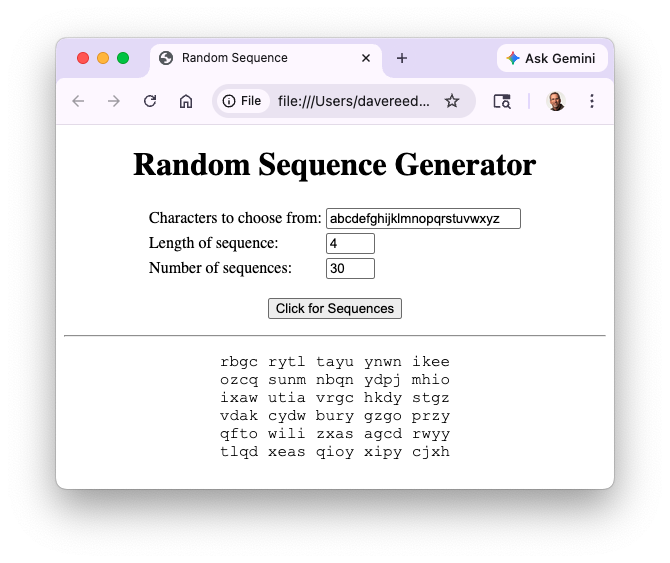
PROJECT 9.D: Extend your Web page from PROJECT 9.C to generate multiple sequences. The page should have an additional number box, where you can enter the number of sequences desired. Your modified page will then need to generate that many random sequences, adding them to a string, and then display that cumulative string in the page. To keep the output orderly, the sequences should be displayed in a monospace font (such as Courier New) and there should be a line break after every 5 sequences. For example:
Use your page to generate 100 3-letter sequences. How many of those sequences were words? Using this number, you can estimate the total number of 3-letter words. For example, suppose you obtained 6 words out of your 100 sequences. From that, you could estimate that 6 out of every 100 sequences (or 6%) are words. Since there are 263 = 17,576 possible 3-letter sequences, that would imply that there are 17,576 * (6/100) = 1,055 words. [FYI, the Official Scrabble Player's Dictionary lists 1,065 3-letter words.]
Using this same process, estimate the number of 4-letter words. That is, generate a large number of 4-letter sequences (you will probably need more than 100) and count the number of words obtained. Since there are 264 = 456,976 possible 4-letter sequences, you would estimate the number of words to be 456,976 * (# words obtained)/(# sequences generated).
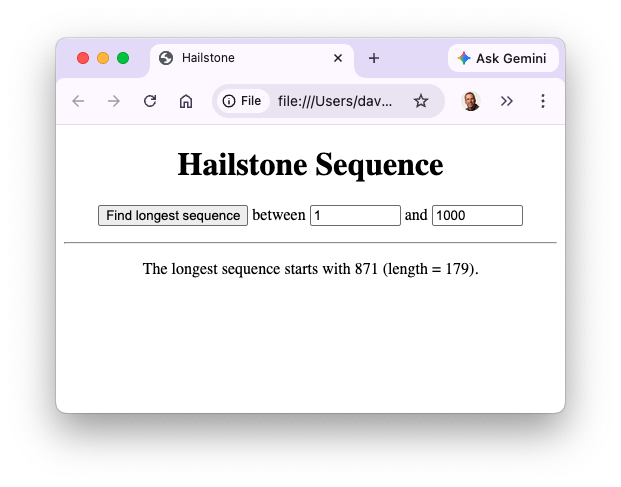
PROJECT 9.E: The longest hailstone sequence that is generated by a starting number from the range 1..100 is 119 (starting at 97). The longest hailstone sequence generated by a starting number from the range 1..1,000 is 179 (starting at 871). The longest hailstone sequence generated by a starting number from the range 1..1,000,000 is 525 (starting at 837,799).
Download a copy of the hailstone sequence page from EXAMPLE 9.7 (by clicking on the Download link) and save it under the name hail.html. Then, extend that page to find the longest hailstone sequence from a specified range of starting numbers. There should be two number boxes, where you can enter the smallest and largest starting numbers in the range. When the button is clicked, hailstone sequences for each starting number in the range should be generated and the longest one determined. For example: